
Project
VDMX Template
Started by 1000errors on .
Sign in or create an account to join the conversation.
Hello, I see no one has posted about vdmx so I thought I would start this off....
So I am looking at making a template for use with vdmx but thought I would get some feedback from others as well as to what the most essential features people would like to see.
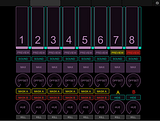
This is a template I have been working on in touch osc before ditching it in favour of the lemur app. It shows the basic layout for an 8 channel mixer controls, with masking options.
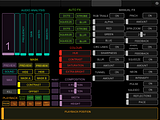
and this page shows a single layer's properties, effects, playback and other features
I am now going to recreate this template with the lemur. When I have this finished I will be posting it along with the corresponding vdmx project for anyone to download a try out and hopefully leave me some feedback.
I am also looking at utilising some of the lemur only functions.
I would like to add assignable oscillators to replace vdmx's built in ones that are used as data sources, obviously having them on the ipad itself makes it easier to work with and hopefully easier to assign on the fly as well.
If anyone has any suggestions comments, requests ect then I am all ears and looking forward to discussing!
www.1000errors.com
So I am looking at making a template for use with vdmx but thought I would get some feedback from others as well as to what the most essential features people would like to see.
This is a template I have been working on in touch osc before ditching it in favour of the lemur app. It shows the basic layout for an 8 channel mixer controls, with masking options.

and this page shows a single layer's properties, effects, playback and other features

I am now going to recreate this template with the lemur. When I have this finished I will be posting it along with the corresponding vdmx project for anyone to download a try out and hopefully leave me some feedback.
I am also looking at utilising some of the lemur only functions.
I would like to add assignable oscillators to replace vdmx's built in ones that are used as data sources, obviously having them on the ipad itself makes it easier to work with and hopefully easier to assign on the fly as well.
If anyone has any suggestions comments, requests ect then I am all ears and looking forward to discussing!
www.1000errors.com
Here is an evenings work....
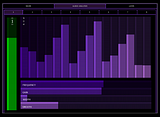
This is the audio analysis page for a single filter (this is page one of eight) the top bit is a 16 band graphic eq which has osc sent from vdmx to and alows the user to view the eq on the ipad as opposed to having to look at the vdmx interface. The green bar shows the level of the filter and the four bottom bars change the 4 attributes of the filter, frequency, width ect.
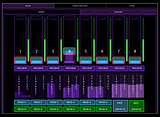
This is the 8 layer mixer page, it is one of two sub mixer pages. This page has basic mixer features, layers 7 and 8 also double a mask layers a and b. Basically at the press of a button layers 7or8 can be assigned to be the mask layer for any of layers 1-6.
Each layer has a single audio analysis filter assigned to it as well(Green slider) that can be used on the mixer page to change the transparency of a layer in conjunction with the layer's overall transparency controlled by the manually controlled fader.
There is another mixer page that is near identical only replaces a few functions, one is buttons that change the opacity of a layer to 100% when held and 0% when released.
I then created another page that is for specific layer controls, within that page are 8 more pages (1 for each layer) and within that is another 2 pages, one is for all the basic controls, playback position, blend modes, x-y position, width, height, colour controls ect (this is incomplete at this moment in time) the other page will be full of controls for fx... I may even make several pages for fx for each layer, depending on how many I want to use
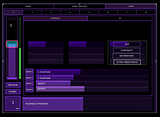
So this isnt finished yet but I think I've made reasonable progress in one night, I have yet to see as comprehensive of a vdmx lemur template elsewhere online.
anyway as I said before I am open to suggestions on what more to add to this and how i may improve it ect. I will be posting the complete template and corresponding vdmx file with it soon.
This is the audio analysis page for a single filter (this is page one of eight) the top bit is a 16 band graphic eq which has osc sent from vdmx to and alows the user to view the eq on the ipad as opposed to having to look at the vdmx interface. The green bar shows the level of the filter and the four bottom bars change the 4 attributes of the filter, frequency, width ect.

This is the 8 layer mixer page, it is one of two sub mixer pages. This page has basic mixer features, layers 7 and 8 also double a mask layers a and b. Basically at the press of a button layers 7or8 can be assigned to be the mask layer for any of layers 1-6.
Each layer has a single audio analysis filter assigned to it as well(Green slider) that can be used on the mixer page to change the transparency of a layer in conjunction with the layer's overall transparency controlled by the manually controlled fader.

There is another mixer page that is near identical only replaces a few functions, one is buttons that change the opacity of a layer to 100% when held and 0% when released.
I then created another page that is for specific layer controls, within that page are 8 more pages (1 for each layer) and within that is another 2 pages, one is for all the basic controls, playback position, blend modes, x-y position, width, height, colour controls ect (this is incomplete at this moment in time) the other page will be full of controls for fx... I may even make several pages for fx for each layer, depending on how many I want to use

So this isnt finished yet but I think I've made reasonable progress in one night, I have yet to see as comprehensive of a vdmx lemur template elsewhere online.
anyway as I said before I am open to suggestions on what more to add to this and how i may improve it ect. I will be posting the complete template and corresponding vdmx file with it soon.
I would love to see the final result. Are you finished with the template?
funny, im literally just doing it at the moment as i got alerted via email someone commented on this thread. I'm still doing it at the moment, its taking me quite a long time to work out sending osc to and from vdmx to the lemur app. Its getting there, osc is new to me so its taking a while. watch this space
funny, im literally just doing it at the moment as i got alerted via email someone commented on this thread. I'm still doing it at the moment, its taking me quite a long time to work out sending osc to and from vdmx to the lemur app. Its getting there, osc is new to me so its taking a while. watch this space
I appreciate that you show the template progress.
You had my interest when assignable oscillators were mentioned as a data source.
Over the past week I've been working on a template that will use lemur-based lfos as midi data sources,
I posted a set of custom buttons in this topic with radiobutton action for waveforms that you might find useful.
-J
You had my interest when assignable oscillators were mentioned as a data source.
Over the past week I've been working on a template that will use lemur-based lfos as midi data sources,
I posted a set of custom buttons in this topic with radiobutton action for waveforms that you might find useful.
-J
hello, I have some more progress completed. So far I have completed and midi assigned (I couldn't get it to work they way i wanted with osc so i am using midi) 2 mixer pages for 8 channels with on the fly assignable making layers. I have also created and onscreen (on the ipad screen) a 16 band eq with independently audio analysis', 1 for each layer. As for the layer specific pages this part is taking me a while, other than repeating the mixer slider and few other functions from the mixer pages I have also created a large playback position slider that moves along with the playback position of the corresponding clip in that layer, this makes for very easy "scratching" of a layer. The only minor fault is it is not that precise on very long clips as is limited to midi's resolution of 128 steps.
my main issue I have run into is midi feedback from vdmx, all the sliders receive midi from vdmx fine but unfortunately the buttons don't seem to work as I had hoped they would. I didnt have a problem with touch osc but for some reason when I use the lemur app I can assign the button to receive midi from lemur, i think i used "toggle on input" and "ignore repeats" then I assigned vdmx to send out to ipad (in my case midi/lemur demon 0, then the corresponding midi channel and number as a cc value) but for some reason when I press the button on the ipad it doesnt stay lit when the corresponding button in vdmx is toggled on. I did find if i then toggled the button in vdmx by clicking on it with the mouse it would then light the button on the ipad but not if i pressed it on the ipad in the way it would work. So my work around, unless anyone can solve this or suggest anything better is this: I create 2 button, one button is purple and lights up green when pressed, the other is black and stays black when pressed, the black button is smaller and sits on top of the purple buttons. The black buttons sends midi to vdmx, and the purple one only receives midi from vdmx, essentially the purple button does nothing but tell me the state of the toggle button in vdmx that I use the black button to toggle. It works fine but it is not as nice and takes up more space than just having the same button pressed also reflect the on off state of the corresponding toggle in vdmx.
I will post a link to a quick video demoing what I have done so far so you can have a better look. I think the page controls are going to take the longest, I am still debating making one for the media bin as I generally find it easier to just click on a video with the mouse than I do find the corresponding button on the ipad. I kind of get the feeling the page controls are going to take a long time, and for anyone else using they might find they don't have the same qtz effects as me or with to use other effects or have different controllable parameters for each effect ect. Though I may just add an additional fx page per layer of blank sliders and assignable buttons so people can set that bit up how they like.
@analog 64 - I will definitely look into your lemur based assignable oscillators and see if I can incorporate them into my template, though I dont know anything of the scripting side of the lemur so I might be asking you for help with this part
wow! that was a long rant, time to get back on making this template!
oh and happy new year everyone!
www.1000errors.com
my main issue I have run into is midi feedback from vdmx, all the sliders receive midi from vdmx fine but unfortunately the buttons don't seem to work as I had hoped they would. I didnt have a problem with touch osc but for some reason when I use the lemur app I can assign the button to receive midi from lemur, i think i used "toggle on input" and "ignore repeats" then I assigned vdmx to send out to ipad (in my case midi/lemur demon 0, then the corresponding midi channel and number as a cc value) but for some reason when I press the button on the ipad it doesnt stay lit when the corresponding button in vdmx is toggled on. I did find if i then toggled the button in vdmx by clicking on it with the mouse it would then light the button on the ipad but not if i pressed it on the ipad in the way it would work. So my work around, unless anyone can solve this or suggest anything better is this: I create 2 button, one button is purple and lights up green when pressed, the other is black and stays black when pressed, the black button is smaller and sits on top of the purple buttons. The black buttons sends midi to vdmx, and the purple one only receives midi from vdmx, essentially the purple button does nothing but tell me the state of the toggle button in vdmx that I use the black button to toggle. It works fine but it is not as nice and takes up more space than just having the same button pressed also reflect the on off state of the corresponding toggle in vdmx.
I will post a link to a quick video demoing what I have done so far so you can have a better look. I think the page controls are going to take the longest, I am still debating making one for the media bin as I generally find it easier to just click on a video with the mouse than I do find the corresponding button on the ipad. I kind of get the feeling the page controls are going to take a long time, and for anyone else using they might find they don't have the same qtz effects as me or with to use other effects or have different controllable parameters for each effect ect. Though I may just add an additional fx page per layer of blank sliders and assignable buttons so people can set that bit up how they like.
@analog 64 - I will definitely look into your lemur based assignable oscillators and see if I can incorporate them into my template, though I dont know anything of the scripting side of the lemur so I might be asking you for help with this part
wow! that was a long rant, time to get back on making this template!
oh and happy new year everyone!
www.1000errors.com
@ analog64 where is this set of custom buttons you posted and what is their name, as I cant find them. Thanks
here's the post with the buttons: http://liine.net/forum/viewtopic.php?f=26&t=804
feel free to ask questions, cheers~
J
feel free to ask questions, cheers~
J
hey 1000errors! that's a nice looking template! could you tell me how you set up the audio analysis? i've been unsuccessful at getting any feedback from vdmx to the lemur... any help would be super appreciated!
Hello, in order to get midi/osc out from vdmx you need to click on the sending tab in the ui inspector, then click the + symbol then choose the relevant midi/osc out, including midi cannel number ect. [img]http://i31.photobucket.com/albums/c394/ElectroBeanz/ScreenShot2012-02-05at160003.png[/img]
To make the onscreen graphic eq i created a new layer with some fx on it. this layer is never used for clips and the fx are turned off its just used to send midi out to a mulitslider on the ipad. i created enogh fx to have 16 sliders on them combined. i also created a audio analysis with 16 filters on it evenly spaced. I then right clicked on the first slider of the first fx and set it to be controlled by audio analysis filter 1, i repeated the same process for another 15 sliders for the other 15 filters. at that what i had was 16 sliders controlled by 16 filters, all i then had to do was send the sliders midi out to a mulitislider on the ipad. i then created anothe audi analysis for the actual controls, as the first one should never be touched and only serves the puposse of displaying the 16 band eq on the ipad. you can very briefly see it in action on my showreel video on the first page of my website www.1000errors.com i will post full videos explaining it on my site soon when i get it finished, i hope this helps for now. Olly

To make the onscreen graphic eq i created a new layer with some fx on it. this layer is never used for clips and the fx are turned off its just used to send midi out to a mulitslider on the ipad. i created enogh fx to have 16 sliders on them combined. i also created a audio analysis with 16 filters on it evenly spaced. I then right clicked on the first slider of the first fx and set it to be controlled by audio analysis filter 1, i repeated the same process for another 15 sliders for the other 15 filters. at that what i had was 16 sliders controlled by 16 filters, all i then had to do was send the sliders midi out to a mulitislider on the ipad. i then created anothe audi analysis for the actual controls, as the first one should never be touched and only serves the puposse of displaying the 16 band eq on the ipad. you can very briefly see it in action on my showreel video on the first page of my website www.1000errors.com i will post full videos explaining it on my site soon when i get it finished, i hope this helps for now.
OllyAwesome! thanks for the post!
works great with midi not so much with osc...
works great with midi not so much with osc...
Hi 1000errors;1000errors wrote:hello, I have some more progress completed.
Firstly congratulations for your nice Works! I visited your web, Your style it's very different and interesting, I like it!!
I see your Lemur template Project, are you finished it?
I was working with Touch OSC also and last week I discovered the lEmur App..
[img]https://fbcdn-sphotos-c-a.akamaihd.net/hphotos-ak-prn1/74241_447083643729_210677_n.jpg[/img]

Thanks!