
General
Button On/Off = how to send NoteOn both times
Started by tobilemur on .
Sign in or create an account to join the conversation.
Hi,
this is an ultra beginner question, I know. Just started and need it very soon, so no time to dive into the manual
(that will come later). Quick help is very appreciated.
How can I build a custom switch button (or lighted/unlighted pad) that sends a Note On when its activated AND deactivated?
So far it only sends it when activated.
thanks a lot, cheers
Tobi
this is an ultra beginner question, I know. Just started and need it very soon, so no time to dive into the manual
(that will come later). Quick help is very appreciated.
How can I build a custom switch button (or lighted/unlighted pad) that sends a Note On when its activated AND deactivated?
So far it only sends it when activated.
thanks a lot, cheers
Tobi
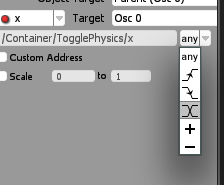
By default, a switch or a pad sends the assigned note on with a velocity x*127.
So when its on, its sends Note ON, note number, velocity 127
when its off, it sends Note ON, note number, velocity 0 -> inteprated to note off as per offcial midi specs.
To make a switch send note ON in both its states, create a "custom midi output" and assign its velocity to a fixed 127 number. Then make sure that "x" triggers the output.
alwaysNoteOn.jzml
So when its on, its sends Note ON, note number, velocity 127
when its off, it sends Note ON, note number, velocity 0 -> inteprated to note off as per offcial midi specs.
To make a switch send note ON in both its states, create a "custom midi output" and assign its velocity to a fixed 127 number. Then make sure that "x" triggers the output.
alwaysNoteOn.jzml
@Softcore:
Just saw it!
Thank you!!
Just saw it!
Thank you!!