
Project
Push for lemur
Started by wul on .
Sign in or create an account to join the conversation.
Work in MacOSX with the cylphx script¡¡
Perfect workflow an i love the zoom view.
Thanks Wul u are the king of 2013¡¡
Perfect workflow an i love the zoom view.
Thanks Wul u are the king of 2013¡¡
Thank you very much Wul for making and releasing this template.
Works well on OS X with both the cylphx and the modified HandshakeComponent.py method.
Only glitch is selecting sharp/flat keys in the scale selection display, looks like the labels are missing the # symbol but it's pretty obvious.
I hope Ableton don't get bothered by this template - it has convinced me I must get a real Push controller as soon as I can afford one!
Excellent work Wul, thanks again.
Works well on OS X with both the cylphx and the modified HandshakeComponent.py method.
Only glitch is selecting sharp/flat keys in the scale selection display, looks like the labels are missing the # symbol but it's pretty obvious.
I hope Ableton don't get bothered by this template - it has convinced me I must get a real Push controller as soon as I can afford one!
Excellent work Wul, thanks again.
You will find a few issues with the display its a compromise
Working fine on mac osx and the handshake method.
The only thing i notice in clip mode the display sometimes doesn,t show some information, like transpose, warp mode, volume, etc...
¿How you guys use the accent button? it makes something in this emulator? since we don,t have dinamic velocity, i thought this button make nothing.
Thanks for this!!!.I agreed, it,s a good way to see if Push fits your workflow.
The only thing i notice in clip mode the display sometimes doesn,t show some information, like transpose, warp mode, volume, etc...
¿How you guys use the accent button? it makes something in this emulator? since we don,t have dinamic velocity, i thought this button make nothing.
Thanks for this!!!.I agreed, it,s a good way to see if Push fits your workflow.
Here are a few resources I've come across to help you learn Push operation.
- The Live 9 manual has a whole section dedicated to Push
- Lynda.com Making Music With Ableton Push
http://www.lynda.com/Ableton-Live-tutorials/Making-Music-Ableton-Push/133319-2.html
- AskVideo Push 101
http://www.askvideo.com/course/push-101-create-perform-with-push
- AskVideo Jordan Rudess - Pushing The Limits!
http://play.askvideo.com/push-201-jordan-rudess-pushing-the-limits/intro
That's the beauty of Lemur templates like this, by the time I can afford a Push I'll know how to use it thoroughly.
If you know any other resources please post them here.
- The Live 9 manual has a whole section dedicated to Push
- Lynda.com Making Music With Ableton Push
http://www.lynda.com/Ableton-Live-tutorials/Making-Music-Ableton-Push/133319-2.html
- AskVideo Push 101
http://www.askvideo.com/course/push-101-create-perform-with-push
- AskVideo Jordan Rudess - Pushing The Limits!
http://play.askvideo.com/push-201-jordan-rudess-pushing-the-limits/intro
That's the beauty of Lemur templates like this, by the time I can afford a Push I'll know how to use it thoroughly.
If you know any other resources please post them here.
I,m in love with this thing.Everything works perfect, it,s amazing!
Could this template work together with other scripts like the PXT? Anyone can confirm this?
Could this template work together with other scripts like the PXT? Anyone can confirm this?
If you want to integrate other scripts they will have to be coded to target a different lemur midi port, e.g I added L'Pad but had to change every object and script to target lemur midi 1. Worked perfectly In fact I added another template in another interface and it took usage up to 95% ish and it still worked.
Basically if you don't do the above , they will conflict
Basically if you don't do the above , they will conflict
congratulations for this accomplishment, wul!
Amazing. Never even considered this was possible. I have no idea how long this took or how you managed to avoid going crazy doing all that in Lemur editor, but I bow down to your skills! Very impressive. Thanks so much!
hey folks...trying to get this up and running...When I load the Shove jzml onto the ipad through the lemur editor while ableton is on, it loads and I see the proper layout on the ipad, and I can send midi to ableton through the push grid but thats it. nothing else works :\
here's a pic of my preferences
[img]http://i.imgur.com/g0QZZrW.png[/img]
is that correct?
Also, Wul, if you don't mind could you direct me to the attachment for the UserSettings?
here's a pic of my preferences
[img]http://i.imgur.com/g0QZZrW.png[/img]
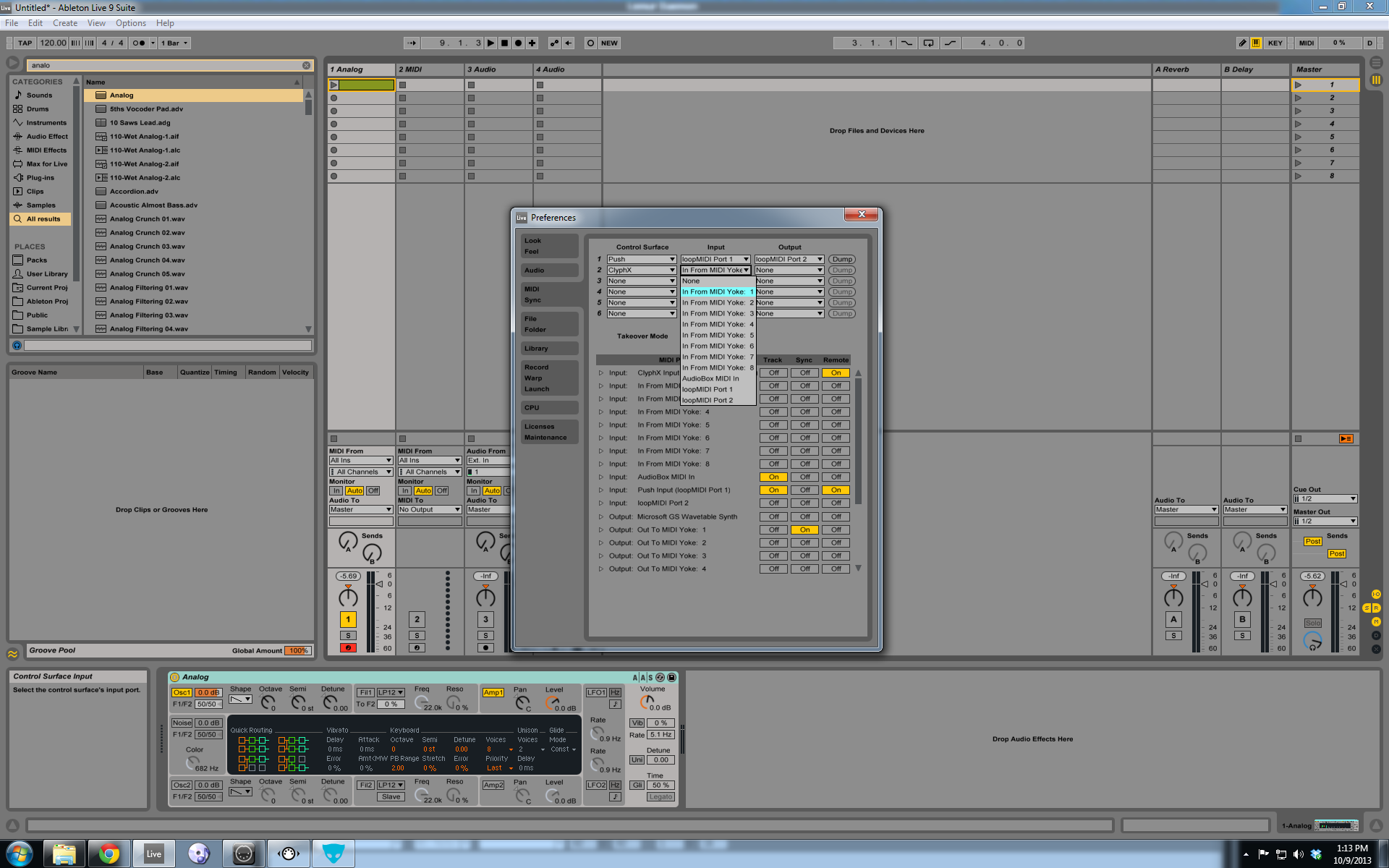
is that correct?
Also, Wul, if you don't mind could you direct me to the attachment for the UserSettings?
just tried using MIDIYOKE instead of LoopMIDI - same problem. Tried reversing my From/To on the lemur app (which broke everything)
just not sure what piece of the puzzle I'm missing
just not sure what piece of the puzzle I'm missing
all credit goes to wul for making template. i just have similar user name. loop midi willwork just fine. under clyphx control surface you dont have to select anything. My screenshoots show and in but there's a reason for that but it is not need to you shove it template. that for my setup. The input from lemur needs to have track and remote on. and out just need track on. i will upload user file again later when at home.But you could close ableton. Go to where your remote scripts are and go to cyphx folder and open user settings in a text editor and you have to add one line under user controls
PUSH_EMULATION = ON
PUSH_EMULATION = ON
[img]http://i.imgur.com/loVLTVw.png[/img]
Like that, right?
Updated to 9.0.6 to make sure that wasn't causing the issue (was using 9.0.2) - still the same problem.

Like that, right?
Updated to 9.0.6 to make sure that wasn't causing the issue (was using 9.0.2) - still the same problem.
******************************* [USER CONTROLS] *******************************
# Below, you can specify a list of MIDI Controls to use as X-Controls.
# The entry format is: CONTROL_NAME = MSG_TYPE, MIDI_CHANNEL, NOTE_OR_CC_NUM, ON_ACTION_LIST
# CONTROL_NAME = A unique one-word name (Identifier) for the control. See [IDENTIFIER NOTE] below.
# MSG_TYPE = The word Note or CC.
# MIDI_CHANNEL = The MIDI Channel number in the range of 1 - 16
# NOTE_OR_CC = The Note or CC number in the range of 0 - 127.
# ON_ACTION_LIST = The Action List to perform when the control sends an on message.
# Example: MY_BTN1 = NOTE, 1, 10, 1/MUTE ; 2/MUTE
# You can optionally specify an Action List to perform when the control sends an off message.
# To do this, place a comma after the On Action List and then specify the Off Action List.
# Example: MY_BTN2 = CC, 16, 117, 1/MUTE ; 2/MUTE, 3/PLAY >
# To perform the same Action List for the On Action List and Off Action List, just specify an asterick
# for the Off Action List.
# Example: MY_BTN3 = NOTE, 5, 0, 1/MUTE, *
# Below is an example list that has been commented out (the # at the beginning of
# a line makes the line a comment). Your list should be formatted in the same way
# except without the # at the beginning of each line.
# btn_1 = note, 1, 0, mute , *
# btn_2 = note, 1, 1, solo
# btn_3 = cc, 9, 2, arm
# btn_4 = cc, 9, 3, mon
PUSH_EMULATION = ON
******************************* [USER VARIABLES] *******************************
Iv'e attached file if your still having problems its gotta be the in and out port from lemur and ableton.
Foe example on lemur (ipad in) im getting midi from design pad in 0 and sending (out of lemur ) to designpad out 0
in ableton my input is from design pad out 0 and output is on design pad in
So looking at your screenshoot your lemur ap should recieve from loopmidi port 2 and send output to loop midi port 1. Also you dont need to select anythong with clyphx i see you had remote selected.
p.s.
UserSettings.zip
# Below, you can specify a list of MIDI Controls to use as X-Controls.
# The entry format is: CONTROL_NAME = MSG_TYPE, MIDI_CHANNEL, NOTE_OR_CC_NUM, ON_ACTION_LIST
# CONTROL_NAME = A unique one-word name (Identifier) for the control. See [IDENTIFIER NOTE] below.
# MSG_TYPE = The word Note or CC.
# MIDI_CHANNEL = The MIDI Channel number in the range of 1 - 16
# NOTE_OR_CC = The Note or CC number in the range of 0 - 127.
# ON_ACTION_LIST = The Action List to perform when the control sends an on message.
# Example: MY_BTN1 = NOTE, 1, 10, 1/MUTE ; 2/MUTE
# You can optionally specify an Action List to perform when the control sends an off message.
# To do this, place a comma after the On Action List and then specify the Off Action List.
# Example: MY_BTN2 = CC, 16, 117, 1/MUTE ; 2/MUTE, 3/PLAY >
# To perform the same Action List for the On Action List and Off Action List, just specify an asterick
# for the Off Action List.
# Example: MY_BTN3 = NOTE, 5, 0, 1/MUTE, *
# Below is an example list that has been commented out (the # at the beginning of
# a line makes the line a comment). Your list should be formatted in the same way
# except without the # at the beginning of each line.
# btn_1 = note, 1, 0, mute , *
# btn_2 = note, 1, 1, solo
# btn_3 = cc, 9, 2, arm
# btn_4 = cc, 9, 3, mon
PUSH_EMULATION = ON
******************************* [USER VARIABLES] *******************************
Iv'e attached file if your still having problems its gotta be the in and out port from lemur and ableton.
Foe example on lemur (ipad in) im getting midi from design pad in 0 and sending (out of lemur ) to designpad out 0
in ableton my input is from design pad out 0 and output is on design pad in
So looking at your screenshoot your lemur ap should recieve from loopmidi port 2 and send output to loop midi port 1. Also you dont need to select anythong with clyphx i see you had remote selected.
p.s.
UserSettings.zip
Hello, i really don't understand how to download the HandshakeComponent.py.
i downloaded github and registred but how to download it please?
thank you
i downloaded github and registred but how to download it please?
thank you
right click and Save Target as or do whatever the mac equivalent of that is
god damnit...I've been trying this for h ours now and still am at the exact same place. Lemur will send midi messages when I press the pads and that's it.
I have uninstalled and reinstalled 9.0.6, tried MIDIYOKE and Loopmidi, tried it on my laptop and on my desktop as I figured maybe it wasn't liking that I was connecting through my router and would prefer an ad-hoc network connection....
At my wits end here trying to figure out why other people have it working (and apparently easily) and why I'm stuck...
and just for sanity..you do have to select Clyphx as a control surface, right? and when you do so, a single yellow/orange box pops up in ableton (similar to the APC40 red box, only its only one clip size large)
and you do load up the lemur editor, open the shove jzml and then Sync to the ipad and it should just work right?
I have tried to be as careful and precise as possible when following the directions but I feel like I'm just missing some tiny thing.
What is this design pad shit you're using? couldn't find it on google...maybe I need to use that?
Fuck. So frustrated and want this so badly.
I have uninstalled and reinstalled 9.0.6, tried MIDIYOKE and Loopmidi, tried it on my laptop and on my desktop as I figured maybe it wasn't liking that I was connecting through my router and would prefer an ad-hoc network connection....
At my wits end here trying to figure out why other people have it working (and apparently easily) and why I'm stuck...
and just for sanity..you do have to select Clyphx as a control surface, right? and when you do so, a single yellow/orange box pops up in ableton (similar to the APC40 red box, only its only one clip size large)
and you do load up the lemur editor, open the shove jzml and then Sync to the ipad and it should just work right?
I have tried to be as careful and precise as possible when following the directions but I feel like I'm just missing some tiny thing.
What is this design pad shit you're using? couldn't find it on google...maybe I need to use that?
Fuck. So frustrated and want this so badly.
Send me a screen shoot of your lemur settings and of ableton control suface settings i can tell you what your doing wrong.
One i would say forget midi yoke you dont need.
Two Design pad is my custom name for loopmidi ports. Im running to ipads with lemur and have seprate ports for both makes complex setup easier.
the most import thing as i see your on pc is seprate loop midi port for in and out. which you had loop midi 1 and 2.
loop midi1 as your input for push script. inside ableton and loop midi 2 as your output in ableton push script. know on ipad loop midi 2 should be selected as input(from) and loop midi 1 as output (to).
Again cylphx has to be installed but nothing selected. it just works. as long as you add that line of code to user settings or just copy the file i uploaded to cylphx folder. and restart live.you should be good. You also dont need to reinstall live.
One i would say forget midi yoke you dont need.
Two Design pad is my custom name for loopmidi ports. Im running to ipads with lemur and have seprate ports for both makes complex setup easier.
the most import thing as i see your on pc is seprate loop midi port for in and out. which you had loop midi 1 and 2.
loop midi1 as your input for push script. inside ableton and loop midi 2 as your output in ableton push script. know on ipad loop midi 2 should be selected as input(from) and loop midi 1 as output (to).
Again cylphx has to be installed but nothing selected. it just works. as long as you add that line of code to user settings or just copy the file i uploaded to cylphx folder. and restart live.you should be good. You also dont need to reinstall live.
Thank you for taking the time to try to help me in my noobishness
I made a youtube video documenting that I have (hopefully) done the first couple steps properly and it shows my ableton configuration and stuff
http://www.youtube.com/watch?v=guBAW6xY_fE&feature=youtu.be
if you can't stand my mumbling and only want to see the ipad screen/ableton screen here is a screenshot:
http://i.imgur.com/ik7Wbzo.png
also using 2.3.3 of clyphx from here:
http://beatwise.proboards.com/thread/992/current-version-clyphx-live-8
thanks!!!
I made a youtube video documenting that I have (hopefully) done the first couple steps properly and it shows my ableton configuration and stuff
http://www.youtube.com/watch?v=guBAW6xY_fE&feature=youtu.be
if you can't stand my mumbling and only want to see the ipad screen/ableton screen here is a screenshot:
http://i.imgur.com/ik7Wbzo.png

also using 2.3.3 of clyphx from here:
http://beatwise.proboards.com/thread/992/current-version-clyphx-live-8
thanks!!!
One thing to remember is you do not need the modified .py script if you are using clyphx just use the normal push scripts.
Also uncheck the remote button in live (I think , can't remember)
With regard to the .py script it doesn't look right in the video, right clicking and save as is the problem there.
Download every remote script as a zip file or copy and paste the text
Also uncheck the remote button in live (I think , can't remember)
With regard to the .py script it doesn't look right in the video, right clicking and save as is the problem there.
Download every remote script as a zip file or copy and paste the text