
General
How do i send two midi cc's with one button
Started by theinfinate on .
Sign in or create an account to join the conversation.
Probably a noob question but i can't figure out how to get a custom button to send twi midi cc's.
I want to have one cc sent when turned on and another cc when it is turned off. I figured out how to do this in bome's midi translator to send two key strokes but i'm sure it's something easy in Lemur.
I want to have one cc sent when turned on and another cc when it is turned off. I figured out how to do this in bome's midi translator to send two key strokes but i'm sure it's something easy in Lemur.
You can easily do that by adding a script in your object with if statements and the ctlout function.
For example
Add script on expression x, any
For example
Keep in mind a second way would be to add two scripts one on expression x, rising from 0 (up arrow) and one on expression x,dropping to zero ( down arrow ) which is essentially a way to seperate the off-to-on state of a switch from the on-to- off state.
Edit: typo in scripts corrected
For example
Add script on expression x, any
if (x==0) ctlout(0, 21, 64, 1);
else ctlout(0, 22, 127, 1);For example
if (x==0) {ctlout(0, 21, 0, 1); ctlout(0, 22, 127, 1); }
else {ctlout(0, 21, 127, 1); ctlout(0, 22, 0, 1);}Keep in mind a second way would be to add two scripts one on expression x, rising from 0 (up arrow) and one on expression x,dropping to zero ( down arrow ) which is essentially a way to seperate the off-to-on state of a switch from the on-to- off state.
Edit: typo in scripts corrected
Sorry to be a pain, i really appreciate your help! What am i doing wrong here? i presume the writing shown in red means that there is a problem?
And also can you have one button make a few buttons set to off?
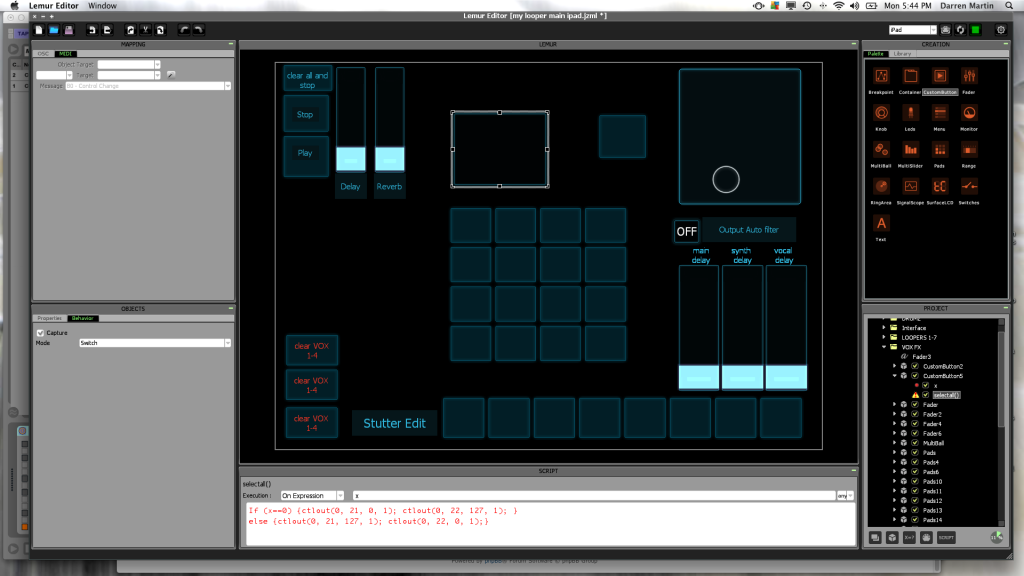
And also can you have one button make a few buttons set to off?

Damnso silly of me, sorry!!!!
I should have typed if not If - the damn auto capitalisation of iPad!!!!
And yes, you figured correctly - red means something is wrong in the script, even if its just only a typo!!!
I should have typed if not If - the damn auto capitalisation of iPad!!!!
And yes, you figured correctly - red means something is wrong in the script, even if its just only a typo!!!
As for making a button control other buttons, if you search the manual or the last, like, 10 of me replies you'll see its a very common question!!! 
Here is more on this subject
http://forum.liine.net/viewtopic.php?f=25&t=2891
Here is more on this subject
http://forum.liine.net/viewtopic.php?f=25&t=2891
thanks a lot for your knowledge but I'm just not getting it and i've been at it for the last couple of hours, i feel like a retard! Where you say CODE:SELECT ALL, is this just random what you call your script line or is it important, do you put this in when it asks,"create script"? but that comes up red when i type it all in caps like you have. Sorry but i've searched how to script but I need a Dummies version of how to script i think!
Been in bed with flu for the last couple of days so my posts were made on the iPad and not actual testing....hold on a sec , im working on an example.....
But no, the name of the script is not important for its functionality - it is just given in the case you want to refer to it from another object....
Brb
But no, the name of the script is not important for its functionality - it is just given in the case you want to refer to it from another object....
Brb
Ok just checked...after the edits the script is functional - probably you have missed a typo somewhere....
Here's an example with also a button that controls the dual CC button AAANNNNNDDDD lol, another button that inverts the way the second button controls the dual button.....
If you 've been using Bomes Im sure you ll get it right away - its just learning the script structure!
dualCCbutton.jzml
Here's an example with also a button that controls the dual CC button AAANNNNNDDDD lol, another button that inverts the way the second button controls the dual button.....
If you 've been using Bomes Im sure you ll get it right away - its just learning the script structure!
dualCCbutton.jzml
Ok I see what caused the confusion, this right here.....
In other words, the "code: select all" is just there so that you can easily copy paste the code and has nothing to do with Lemur!
some script or code here....In other words, the "code: select all" is just there so that you can easily copy paste the code and has nothing to do with Lemur!
AHHHHHH your the man! I was using message on control change before, as soon as i change it to notes it works fine. I'm sort of getting it now, thanxs so much for getting out of bed, hope your flu gets better!
Thanx for the explanation, I am new to the world of scripting so i miss the obvious things like that! I always want to know how to do it, saw this Lemur app on youtube, i think it was Rheynelooper or something like that that sold it for me. That day i bought 2 ipads for i saw the awesome potential straight away. Now i have to learn!Softcore wrote: I always thought it was common knolwedge and helps visually to distinguish code from text.
Do any of you Pro dudes do scripting for money? Like if i wanted a complex template or something?
Well Im not a pro-coder either - I was, like you, just fascinated with the idea of designing my "dream controller"....But after the design of your dreams (in terms of taxonomy) is realised, you soon start to think how to enhance it with scripting and the "automated" functions it can provide.
For really elegant, code-wise, templates I have a personal admiration to the works of AB! Search in the user library for his stuff, also Mat is another one to look out for! The built-in templates that come with Lemur actually include some of their works. A lot of other people have marvelous contributions though!
For really elegant, code-wise, templates I have a personal admiration to the works of AB! Search in the user library for his stuff, also Mat is another one to look out for! The built-in templates that come with Lemur actually include some of their works. A lot of other people have marvelous contributions though!
Ok thanxs, looks like i'm gonna jump into the rabbit hole here! I'm really after a visual meter on Lemur with levels sent from Ableton. Looks like this question has been asked a few times so i'm on the mission of figuring out how to use the Mu template for MFL or maybe the mackie emulations. I really haven't used Max for live at all either so a lot to learn there too! A dream controller is what i must have!! 
Guys,
How to do it with fader?
As I understood third value should be dynamic in script as this is not just on/off - if (x==0) ctlout(1, 48, ???, 1);
Can you help me with correct scripting?
How to do it with fader?
As I understood third value should be dynamic in script as this is not just on/off - if (x==0) ctlout(1, 48, ???, 1);
Can you help me with correct scripting?
Do what exactly? The fader sending two midi CCs?
yesSoftcore wrote:Do what exactly? The fader sending two midi CCs?
select your fader....tap on button "x=" (desktop editor)....
Pop up window appears, name it anything, example k
A new expression "k" appears inside the object - type in it x (so that k=x).
Now "k" is midi mappable just like x is. The fader will now send two midi messages - the one x is mapped, and the one k is mapped. (remember in the "k" mappings to enable scale 0 - 127)
bonus feature: in case you want the fader to send two "oposite" messages..... (when its 0, one message is zero the secondf one is full)....then just type in k 1-x, so that k=1-x
Pop up window appears, name it anything, example k
A new expression "k" appears inside the object - type in it x (so that k=x).
Now "k" is midi mappable just like x is. The fader will now send two midi messages - the one x is mapped, and the one k is mapped. (remember in the "k" mappings to enable scale 0 - 127)
bonus feature: in case you want the fader to send two "oposite" messages..... (when its 0, one message is zero the secondf one is full)....then just type in k 1-x, so that k=1-x
Thank you, Softcore - it works!
P.S. Just in my case, I have created two faders in different interfaces - they syncing fine (2 in Lemur, 1 in Traktor and 1 in Ableton).
P.S. Just in my case, I have created two faders in different interfaces - they syncing fine (2 in Lemur, 1 in Traktor and 1 in Ableton).