
General
wrong text place after Apps Update
Started by Home Studio 87 on .
Sign in or create an account to join the conversation.
today I download the latest lemur Apps update (3.2) and the new soft instaler (Win 3.2) & now all the Mackie template have track name move to the left !!!
see the photo (sorry for the quality made by my old iphone on ipad ) http://www.4shared.com/photo/T7LElnq8/IMG_0034.html
see the photo (sorry for the quality made by my old iphone on ipad ) http://www.4shared.com/photo/T7LElnq8/IMG_0034.html
Just have an emai from an user exactly with the same problem in one of my templates. may be a 3.2 bug?
One question though, in the editor your template looks fine right?, the text "offset" happens when you sync the template with iPad?
Thank you,
AB
One question though, in the editor your template looks fine right?, the text "offset" happens when you sync the template with iPad?
Thank you,
AB
my templates is have a problem. ı m use ıpad1 and ı wass update last version but all font is blurry ı think last update is have same problem..
Hi, yes thanks for the update but sorry to say I also have the same issue. Editor text is fine but when transferred to app it is off centre to left. Sure it's an easy enough fix though, so thanks in advance 
P?S. Just for info iPad 3 here
t_t
P?S. Just for info iPad 3 here
t_t
I just updated the lemur app (iPad 1) and got the same problem that namikayapina, some characters looks bad, trying typing the O character, it put there a perfect circle 
Cheers,
Cheers,
iPad2: yes, at text size 9 and 10 the O looks like a circle. Text sizes 9-16 look bad. 8 and 17-24 look good. It doesn't necessarily show in this screenshot, but it's clearly visible on the iPad's screen. I've attached the template below.
[img]http://i113.photobucket.com/albums/n202/Phil999_02/IMG_0147.png[/img]
well I guess the not good looking text sizes are because of the lacking resolution of iPad1+2. Not sure if this is easy to fix. But the real disadvantage of 3.2 is that you can't save a template anymore (Windows). The file is not written to disk. Holy cow!
Is there a way to rollback the app to 3.1?
3.2 text test.jzml
[img]http://i113.photobucket.com/albums/n202/Phil999_02/IMG_0147.png[/img]
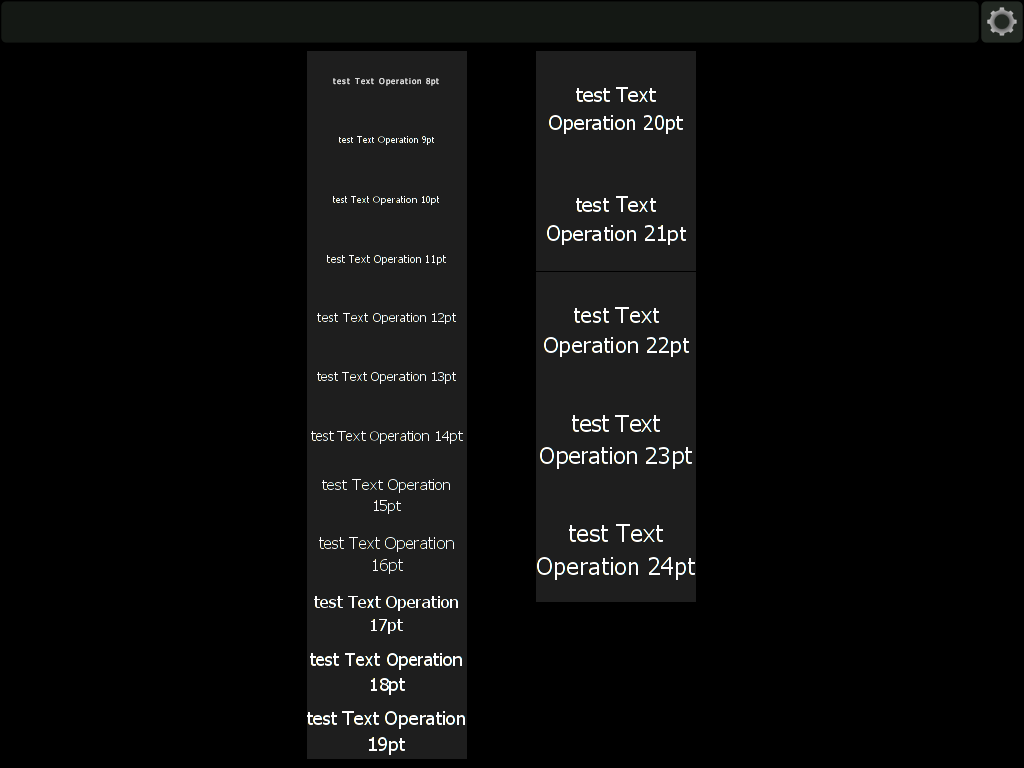
well I guess the not good looking text sizes are because of the lacking resolution of iPad1+2. Not sure if this is easy to fix. But the real disadvantage of 3.2 is that you can't save a template anymore (Windows). The file is not written to disk. Holy cow!
Is there a way to rollback the app to 3.1?
3.2 text test.jzml
Hi,
Please get in touch with support if you're unable to save your Projects on Windows.
Thanks,
Nick
Please get in touch with support if you're unable to save your Projects on Windows.
Thanks,
Nick
template saving works now. I don't understand it. It didn't work before, I tried it twice, refreshed Explorer. Strange. Anyway, it works now. Sorry for the false alarm.
Just to reinforce Antonio's point, please see screenshots of his templates with misaligned text:
1. Affected: Axis Rate, Phase, Pitch, Velocity - font on sliders + Main, Phase, Pitch, Velocity etc. under the modulation wheel slider - they should be on top of red dot buttons
http://i.imgur.com/iRrWf.png
2. Affected - top tabs - Mod A, Mod B etc.
http://i.imgur.com/MAVtH.png
3. Affected: Axis Rate, Phase, Pitch, Velocity - font on sliders
http://i.imgur.com/8hRhC.png
Lemur 3.2 running on iPad 3, templates look perfect on Lemur Editor, become skewed after transfer to device
1. Affected: Axis Rate, Phase, Pitch, Velocity - font on sliders + Main, Phase, Pitch, Velocity etc. under the modulation wheel slider - they should be on top of red dot buttons
http://i.imgur.com/iRrWf.png

2. Affected - top tabs - Mod A, Mod B etc.
http://i.imgur.com/MAVtH.png

3. Affected: Axis Rate, Phase, Pitch, Velocity - font on sliders
http://i.imgur.com/8hRhC.png

Lemur 3.2 running on iPad 3, templates look perfect on Lemur Editor, become skewed after transfer to device
I am getting the same issue on my iPad 2. The text was not clear at first and then I noticed that it is misaligned too. Is this a bug in the particular version? Is there anything I can do to fix this?
__________
David Fischer
__________
David Fischer
Dude, did you get hacked? This is useless advice and you're spamming some crap