
Project
Sonic Charge uTonic update/remake version 1.5
Started by mism on .
Sign in or create an account to join the conversation.
Hi everyone,
credits go to chris michaels who had the idea and did the first version, including all of the assignments of uTonic, except those I added additionally. BIG THANK YOU!!
Actually I only wanted to do the midi assignments in uTonic, because the megaupload link was leading kinda nowhere. I ended up spending three looong nights doing changes on the lemur template in the end. In terms of functionality and layout I thought it was worth it and wanted to share it with the liine community. I hope you enjoy. This is my first upload at all, so be kind to me.
List of changes:
- almost complete remake of the layout
- changed positions and size on most of the objects
- changed and/or added text on most of the objects
- grid behavior (with text) on some of the faders where it was useful
- added two extra faders for separate control of attack and decay
- added stereo on/off custom pad
- changed colors (I hope they are O.K., because I am colorblind, if not change them ). Did same
colors for OSC or Noise controllers
- added an extra fader for the soundmorpher which makes an additional
control with the Ring area that existed. This is especially useful if you want to do adjustments on
different positions, because Ring area always jumped back to it´s mid position. It also works great
with the additional scripts that can be downloaded at Sonic Charge Forum.
- exchanged some pads with custom buttons, including different text regarding position and
function of the faders.
I also include the missing Microtonic midi file for uTonic. Please load it before using the lemur template > open uTonic midi confg. / load confg. Make sure midi is lit at the top of uTonic if that is not already so.
Open lemur daemon and set it up with e.g. : Midi 0 "Daemon output 0" and "Daemon input 0". if you haven´t done so already (actually "Daemon input 0" is enough, because the iPad doesn´t get updated the other way around anyway, except the sequence data on trig pads as far as I know, but I have set it up like this for my other templates) . Make sure you choose "Daemon input 0" on your "midi in" in the track of your DAW to control uTonic.
I also tried a sequencer on a second interface to control uTonic, but timing was so bad that I forgot about that quickly. Mat max sequencers would probably work much better, but I haven´t tried that (I will though).
An extra multiball page might be nice for more craziness. Maybe I´ll do one in the future, but I have to learn that first.
If someone else has the knowledge and time go ahead, I would definitely appreciate it, until then I added the awesome Antonio Blanca (thanks Antonio!!!) Kontrolab [2] and AB CCELL on additional interfaces on my personal uTonic lemur template to do control changes in Ableton or even extra control of uTonic which is great, but needs some additional changes in the lemur daemon and AB´s template´s midi confg. to make it work nicely without midi conflicts, depends on how you want to use them (not included in this .jzml!).
[size=150]
Original version by chris michaels:[/size]
[img]https://lh6.googleusercontent.com/-hWWrKfn8oY8/T5pUJ6MMm2I/AAAAAAAAAHE/leEJ87mc-3s/s574/photo.jpg[/img]
[size=150]
My updated remake version 1.5[/size]
[img]https://lh5.googleusercontent.com/-A20YuesoHt4/T5pUSZC1BhI/AAAAAAAAAHA/1RbEk8uNG-M/s583/microtonic%2520screenshot.jpg[/img]
http://liine.net/en/community/user-library/view/244/
Peace
Markus
My uTonic 1.5 update.jzml
MicroTonic MIDI Config.scmc.zip
credits go to chris michaels who had the idea and did the first version, including all of the assignments of uTonic, except those I added additionally. BIG THANK YOU!!
Actually I only wanted to do the midi assignments in uTonic, because the megaupload link was leading kinda nowhere. I ended up spending three looong nights doing changes on the lemur template in the end. In terms of functionality and layout I thought it was worth it and wanted to share it with the liine community. I hope you enjoy. This is my first upload at all, so be kind to me.
List of changes:
- almost complete remake of the layout
- changed positions and size on most of the objects
- changed and/or added text on most of the objects
- grid behavior (with text) on some of the faders where it was useful
- added two extra faders for separate control of attack and decay
- added stereo on/off custom pad
- changed colors (I hope they are O.K., because I am colorblind, if not change them
). Did same colors for OSC or Noise controllers
- added an extra fader for the soundmorpher which makes an additional
control with the Ring area that existed. This is especially useful if you want to do adjustments on
different positions, because Ring area always jumped back to it´s mid position. It also works great
with the additional scripts that can be downloaded at Sonic Charge Forum.
- exchanged some pads with custom buttons, including different text regarding position and
function of the faders.
I also include the missing Microtonic midi file for uTonic. Please load it before using the lemur template > open uTonic midi confg. / load confg. Make sure midi is lit at the top of uTonic if that is not already so.
Open lemur daemon and set it up with e.g. : Midi 0 "Daemon output 0" and "Daemon input 0". if you haven´t done so already (actually "Daemon input 0" is enough, because the iPad doesn´t get updated the other way around anyway, except the sequence data on trig pads as far as I know, but I have set it up like this for my other templates) . Make sure you choose "Daemon input 0" on your "midi in" in the track of your DAW to control uTonic.
I also tried a sequencer on a second interface to control uTonic, but timing was so bad that I forgot about that quickly. Mat max sequencers would probably work much better, but I haven´t tried that (I will though).
An extra multiball page might be nice for more craziness. Maybe I´ll do one in the future, but I have to learn that first.
If someone else has the knowledge and time go ahead, I would definitely appreciate it, until then I added the awesome Antonio Blanca (thanks Antonio!!!) Kontrolab [2] and AB CCELL on additional interfaces on my personal uTonic lemur template to do control changes in Ableton or even extra control of uTonic which is great, but needs some additional changes in the lemur daemon and AB´s template´s midi confg. to make it work nicely without midi conflicts, depends on how you want to use them (not included in this .jzml!).
[size=150]
Original version by chris michaels:[/size]
[img]https://lh6.googleusercontent.com/-hWWrKfn8oY8/T5pUJ6MMm2I/AAAAAAAAAHE/leEJ87mc-3s/s574/photo.jpg[/img]

[size=150]
My updated remake version 1.5[/size]
[img]https://lh5.googleusercontent.com/-A20YuesoHt4/T5pUSZC1BhI/AAAAAAAAAHA/1RbEk8uNG-M/s583/microtonic%2520screenshot.jpg[/img]
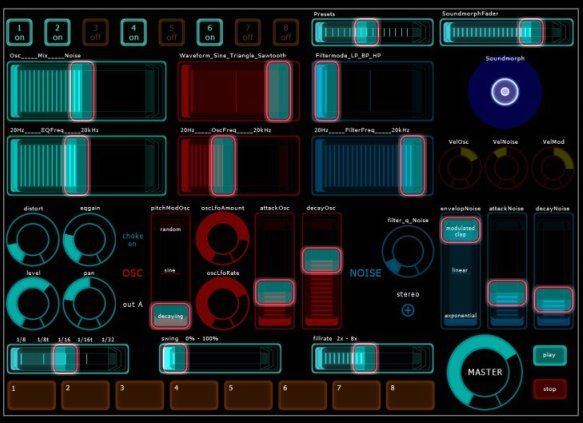
http://liine.net/en/community/user-library/view/244/
Peace
Markus
My uTonic 1.5 update.jzml
MicroTonic MIDI Config.scmc.zip
Nice Mod here. I've already done something similar to yours before quite a long time. Didn't have the chance to touch it again. Since you are into it you can have a look at mine. Do what ever you like with it.
We had pretty much the same approach. As a plus I had added some pads to change balance position of the ring area and some pads for changing programs. The attached file is just a renamed jzml file and not a zip file.
microtonic-controller.jzml.zip
We had pretty much the same approach. As a plus I had added some pads to change balance position of the ring area and some pads for changing programs. The attached file is just a renamed jzml file and not a zip file.
microtonic-controller.jzml.zip
Sorry for the late reply...
Thanks for the kind words kraftf!
Nice to read at least one postive feedback. It seems at it is not common to say something nice to people who invest (a lot of) time to do templates for this community, this can
in the worst case lead to less user templates, because developers do not get enough recognition for doing them...dangerous..., but understandable
Thanks for sharing your version. Pretty similar approach, in fact I wanted to do "dec" / "inc" pads for the programm change but didn´t have the patience to find
out, your pads for that do their job as well, but I guess I can´t make em fit in "mine".
Just wanted to say thanks to all involved. Been dreaming of a way to control utonic without the mouse and now I have it!!
Is there anyway to generate feedback to the Lemur template?
Is there anyway to generate feedback to the Lemur template?
Thanks richi, glad you like the remake.rishi wrote:Just wanted to say thanks to all involved. Been dreaming of a way to control utonic without the mouse and now I have it!!
Is there anyway to generate feedback to the Lemur template?
It is possible to generate feedback, but unfortunately "only" the pads at the bottom get sequence info. Not sure, but I think a general feedback where all faders and knobs
get updated in their postition is not possible.
I don´t know which DAW you use, in Ableton I create an extra midi track and choose midi in "from microtonic" and midi out "to the lemur daemon 0". You might want to
set this midi channel in Lemur daemon first if you haven´t done so yet. The bottom row pads 1-8 should be flashing according to the sequence data of those sounds.
I hope this helps.
Device control on Touchable offers an 'update' button. this serves the purpose of updating all controls to current positions.
If we were able to send the update message along with (straight after) the channel button message we might be able to do a parameter update.
it wouldnt show automation or morphing but it would give us a way to work with the controls at correct settings???
Just a thought not sure if this is possible.
Good thought. An update button might do the trick.rishi wrote:Device control on Touchable offers an 'update' button. this serves the purpose of updating all controls to current positions.
If we were able to send the update message along with (straight after) the channel button message we might be able to do a parameter update.
it wouldnt show automation or morphing but it would give us a way to work with the controls at correct settings???
Just a thought not sure if this is possible.
I´ll have to look into that and maybe ask one of our master template designers. It will probably take a few days until I find out, but I am curious
about this as well and it would be great to have it.
I will post it here whenever I find out more, so check back once every while...
Cool. Subscribed to the topic !!
Sweet man. I did the first one in a rush and got busy and was never able to get back to it. Glad someone was able to update it. This is great.
μTonic is soooooo underrated - its the perfect drum synth for live situations! Big thanks for this controller - I already have some ideas about the updating issue - I will check out your work and see what I can do!
BTW: its an "μ" not a "u" - greek m letter - as far as I know its also used in metric system for micro (m = milli, μ=micro)
BTW: its an "μ" not a "u" - greek m letter - as far as I know its also used in metric system for micro (m = milli, μ=micro)
You are right. Its the greek letter μ pronounced as mi and stands for micro. I am greek and proud for the usage of greek letters and language in science.Softcore wrote:μTonic is soooooo underrated - its the perfect drum synth for live situations! Big thanks for this controller - I already have some ideas about the updating issue - I will check out your work and see what I can do!
BTW: its an "μ" not a "u" - greek m letter - as far as I know its also used in metric system for micro (m = milli, μ=micro)
I know bro! Im greek too!
Back on topic, I used a totally different approach to get bi-directional communication - instead of using μTonic's midi mapping system, I created a, rather similar to the poists above, interface in Lemur but with a slight difference:
There is a container with 8 tabs (not shown) and the top buttons choose the relevant tab. So each tab has the same controls but for the 8 different "drum slots". I then use the host DAW mapping system to map a total of around 160-170 parameters. Troublesome work BUT now I have a working μTonic Lemur interface complete with visual feedback. The amount of controls (inside Lemur) spread in midi channels 13 and 14 in order to not interfere with my other mappings.
If anyone is interested I guess I can upload my Lemur project but I'll stress it again: it needs manual midi mapping of LOTS of parameters inside your preferred DAW.
I am interested!Shoot it..
Ok here you are....
http://www.sendspace.com/file/io0blv
This is how it looks - there are no mute buttons per drum channel and the three far-on-the-left modulation knobs as I wasnt in need of them! If more people ask for this, I will incorporate these too, make it a complete μTonic interface and upload it in the user library!
The "morph" fader with physics on returns to zero (far-left) position for quick break-down effects while with physics off you can set the morph amount and it stays there!
[img]http://i48.tinypic.com/34t8g01.jpg[/img]
Also, as a note for those planning to map it in Ableton Live via Live's native midi mapping system - there is this stupid 128 max parameters per plug in limitation. I overcame it by mapping mTonic's first drum channel to the plug in itself (therefore have no actual bi-directional control) and a few other controls that I didnt feel "critical" to have bi-directional control (such as the mono-stereo buttom on the noise oscillators). I dont see the reason why this limitation would also apply to other DAWs however!
http://www.sendspace.com/file/io0blv
This is how it looks - there are no mute buttons per drum channel and the three far-on-the-left modulation knobs as I wasnt in need of them! If more people ask for this, I will incorporate these too, make it a complete μTonic interface and upload it in the user library!
The "morph" fader with physics on returns to zero (far-left) position for quick break-down effects while with physics off you can set the morph amount and it stays there!
[img]http://i48.tinypic.com/34t8g01.jpg[/img]

Also, as a note for those planning to map it in Ableton Live via Live's native midi mapping system - there is this stupid 128 max parameters per plug in limitation. I overcame it by mapping mTonic's first drum channel to the plug in itself (therefore have no actual bi-directional control) and a few other controls that I didnt feel "critical" to have bi-directional control (such as the mono-stereo buttom on the noise oscillators). I dont see the reason why this limitation would also apply to other DAWs however!
He thanks for a different version of μTonic guys, I hear ya greeks (check the μ instead of u),
had to cheat a bit by copy and paste a bit, but...
Sorry for being off for a while, haven´t really found and looked much into a final solution for the
bi-directional communication.
I thought about the way Softcore did it as well in a way, but was not really satisfied enough to
finish it, so thanks for a kinda different, stripped down, nice and useful approach on this.
Peace
Has anyone found a way to map the grid sequencer in uTonic to midi? Everything else seems to map except that. Having another page that would allow you to manipulate the patterns like a launchpad or monome would be really great.
This would be ideal but unfortunately, impossible. I have posted this as suggestion over at SonicCharge forums but frankly this is a feature too specialised to be implemented (mappable sequencer steps).
Hey everybody
i love uTonic long time ago and use it with mouse but now i'have an ipad and the lemur app, id'love to control it.
But i've some problem since i begin few weeks ago,programming my own template, or wanna use the wonderful template you made guys.
i don't success for control each parameter for the 8 drums channel of the plugin with the remake 1.5 version and even with the first one.
Is this is normaly working for you ? (having all the control but for each drum channel)
my settings with jazz daemon( output and input 0 ) are OK, but how to do for assign all the parameters ? i work on imac with ableton 8 and 9
Otherwise, i've seen your post Softcore and would like to try your template for which sendspace link is dead. Could you sent it to me or re-upload it please ?
i'm very interested cause you say you can have each parameter or each channel drum, like i want to do with the others.
Thanks a lot for you works guys, try to understand scripting and etc... buti've a feeling it's higher and harder than to clim the everest... so mathematics... and me so stupid
Ok first of all lets make things clear....You have two options in the way mTonic will be midi-mapped: either with its native system or with Live's sustem.
Using the native μTonic's method you have the option whether one control (for example one knob) will control one parameter (for example distortion amount) of all 8 drum slots or if 8 knobs will be required, one for each slot .
The option is located in "MIDI config" settings of μTonic:
"Midi CC operate on selected channel" - if this is checked its the "one for all slots" scenario, if unchecked its the "one for one slot" scenario
What you CANT have with the native system is the feedback.
What you CANT have with Ableton's Live system is the option "one for all slots" scenario above, and you have bi-directional feedback for most (but not all, maximum 127) controls (they are more than that, believe me) and again, not in all cases - for example, not when morphing with the fader, or not when loading a patch remotely i.e. by sending program changes from Lemur (it does work if you change patch via mouse though).
Ok, now that you understand the options, let me go find that file - its on my gig-ing laptop - I'll be back.
Thanks a lot for taking time to help !
if i 've well understood, knowing i use only Live,
i'll must use your template which contains no more control/buttons... than the 127 Ableton Live allows and uncheck the "Midi CC operate on selected channel" to get "one knob for one slot"
now i know i can use all the main controls except the three on the right and some less intersting ones like stereo for the noise etc..
but you said in previous post you mapped the first drum channel "in the plugin itself" to catch it too
so i just don't understand how to do that ? this native mode is to see with the "mode" option in "midi config" ?