
General
inbound MIDI system exclusive processing
Started by analog604 on .
Sign in or create an account to join the conversation.
[30 Dec 2012 edit update]: earlier this year Liine increased MIDI in to 256 bytes which is the current Vector (array) element limit as of Lemur version 4.0. Some synths that I own, the Waldorf Pulse, AdrenaLinn FX pedals are good with only 256 and I have those working with bidirectional syste exclusive messages in templates.
Greetings !
Ok so I've been trying many tests to get Lemur process as much inbound SysEx (F0) data as possible on iPad.
Tried using iRig with direct MIDI and via Lemur Daemon. Getting basically the same results.
Sysex data receive is almost always incomplete by the time "execution: On MIDI" F0 - System Exclusive / MIDI 0 / 0-127/1 to 1
script finishes or even starts according to my debug monitors and on computer MIDI monitoring (Mac OS X 10.7./USB MIDI via AMT-8)
I can understand that sometimes this has to do with time running out by going beyond the Lemur frame rate (16ms) due to the limits of MIDI transmission speed of a particular device (synth, FX unit..) for the amount of bytes.
[edit: this was caused by a bug that comes up when the AMT-8 USB interface is used with Lemur Daemon on Mac; I can get 127 bytes now every time over Wifi with a different MIDI interface]
As mentioned on the forum in other threads we are getting different sizes of return data into MIDI_ARGS almost always incomplete if greater than about 20bytes. Maximum return I've been able to get is not much more than 50bytes.
Guys are there any tips / programming workarounds that you have been using for this to work? What are the max bytes that you have been able to receive and from what device/connection method?
I really need to be able to get edit buffer preset data from devices to set the Lemur controls.
Liine wizards, a more advanced incoming MIDI listen/receive would be greatly appreciated. Maybe something that has a timeout value and a last expected byte (F7) or array.
[edit: MIDI listen sysex may already work for greater than one 16ms Lemur frame.. but no one at Liine has confirmed]
I think what we might need is a listener capable of paying attention beyond a single frame and only executing it's script when the timeout is reached (and thereby setting an error flag) or at the end of expected bytes(s).
cheers~
Jay
Liine team, I offer my time and scripting abilities to beta test any extended or new system exclusive functions/object tie-ins with my various MIDI machines.

-J
-J
Funny enough I have started to work on a template to control a Roland synth via sysex. After struggling with stuff like creating the correct checksum byte for a roland device, here is what I got to work:
- bi-derictional control of patch parameters like cutoff frequency etc.
- read out specific patch parameter like parameter name
The sysex messages I used so far were around 12 to 15 bytes. So I did not experience any data loss yet.
Liine clearly stated that there is a limitation in the number of bytes transferred via sysex and the max length of arrays. So for the time being I will keep my sysex messages as short as possible. I'll keep you posted if I run into any troubles.
Btw, what is the best way of receiving sysex messages? With a general on midi expression or with midi on expression on the single objects like knobs or faders? In the first case I would have a "monster" script handling all possible different messages (script length imit!). In the latter I would have a lot of small scripts triggered by each sysex message. Any input would be highly appreciated.
Cheers,
B.
Hi bxsj!
So 12-15 bytes out toward the Roland. Ok.
I haven't extensively pushed the size envelope towards an instrument, but I've been ok sending small less than 15byte sysex requests to update parameters in AdrenaLinn FX pedal. I've done this for days now while debugging my latest template with no problems there.
Also outbound sysex request works requesting the buffer/patch of that and DSI Mopho and Waldorf Pulse.
The devices almost always get the message and respond back correctly at the MIDI interface layer. The responses frequently do not make it from the Lemur app (or IPad??) what I guess to be the Lemur MIDI handling data to the script layer...
So far as I know there is only one way to tie in objects to incoming MIDI and that is to create a script that runs on Execution MIDI + F0- System Exclusive. So one script will need to decode the contents of the message and run additional scripts or alter objects,
there isn't much time to do this so it needs to be as short as possible.. which of course is going to be difficult in decoding complex messages.
Here is a working (system specific to be used only on AdrenaLinn 3 FX pedal) example with lots of debugging variable info assignment.
It works as far as sometimes receiving the response to a universal sysex id request, and telling me that other receives are incomplete (example: drumbeat buffer around 50 bytes, never gets that.. but it sometimes receives enough to tell me that a drum beat was sent)
[img]http://d-spacestudios.com/lemurDev/Lemur-inbound-sysexDecode.png[/img]
Note, global variables not shown:
targman={0x00, 0x01, 0x37}
targmodel=0x03
io.VARABLE and mio.VARIABLES from my midi i/o module, various midi related handling and debugging.
So 12-15 bytes out toward the Roland. Ok.
I haven't extensively pushed the size envelope towards an instrument, but I've been ok sending small less than 15byte sysex requests to update parameters in AdrenaLinn FX pedal. I've done this for days now while debugging my latest template with no problems there.
Also outbound sysex request works requesting the buffer/patch of that and DSI Mopho and Waldorf Pulse.
The devices almost always get the message and respond back correctly at the MIDI interface layer. The responses frequently do not make it from the Lemur app (or IPad??) what I guess to be the Lemur MIDI handling data to the script layer...
So far as I know there is only one way to tie in objects to incoming MIDI and that is to create a script that runs on Execution MIDI + F0- System Exclusive. So one script will need to decode the contents of the message and run additional scripts or alter objects,
there isn't much time to do this so it needs to be as short as possible.. which of course is going to be difficult in decoding complex messages.
Here is a working (system specific to be used only on AdrenaLinn 3 FX pedal) example with lots of debugging variable info assignment.
It works as far as sometimes receiving the response to a universal sysex id request, and telling me that other receives are incomplete (example: drumbeat buffer around 50 bytes, never gets that.. but it sometimes receives enough to tell me that a drum beat was sent)
[img]http://d-spacestudios.com/lemurDev/Lemur-inbound-sysexDecode.png[/img]
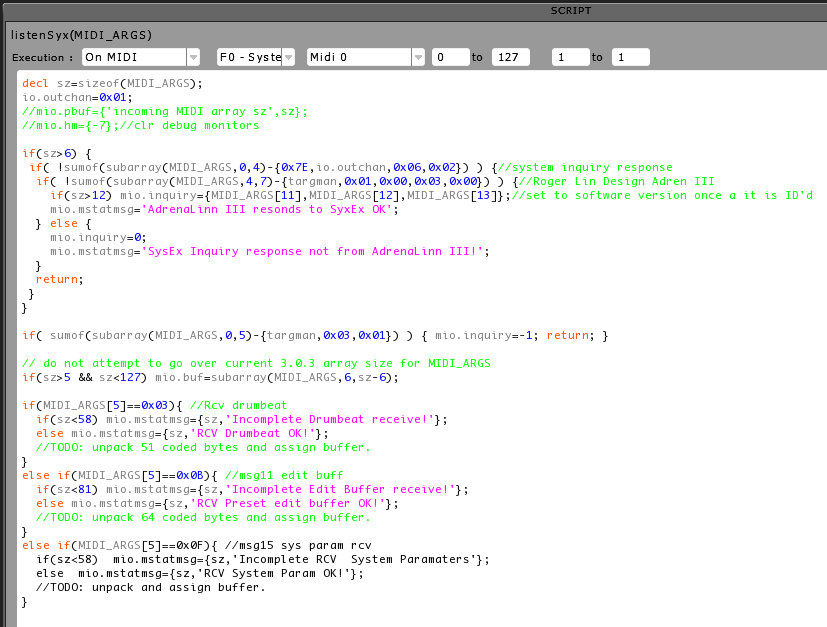
Note, global variables not shown:
targman={0x00, 0x01, 0x37}
targmodel=0x03
io.VARABLE and mio.VARIABLES from my midi i/o module, various midi related handling and debugging.
decl sz=sizeof(MIDI_ARGS);
io.outchan=0x01;
if(sz>6) {
 if( !sumof(subarray(MIDI_ARGS,0,4)-{0x7E,io.outchan,0x06,0x02}) ) {//system inquiry response
  if( !sumof(subarray(MIDI_ARGS,4,7)-{targman,0x01,0x00,0x03,0x00}) ) {//Roger Linn Design Adren III
    if(sz>12) mio.inquiry={MIDI_ARGS[11],MIDI_ARGS[12],MIDI_ARGS[13]};//set to software version once a it is ID'd
    mio.mstatmsg='AdrenaLinn III resonds to SyxEx OK';
  } else {
    mio.inquiry=0;
    mio.mstatmsg='SysEx Inquiry response not from AdrenaLinn III!';
  }
  return;
 }
}

if( sumof(subarray(MIDI_ARGS,0,5)-{targman,0x03,0x01}) ) { mio.inquiry=-1; return; }

// do not attempt to go over current 3.0.3 array size for MIDI_ARGS
if(sz>5 && sz<127) mio.buf=subarray(MIDI_ARGS,6,sz-6);

if(MIDI_ARGS[5]==0x03){ //Rcv drumbeat
  if(sz<58) mio.mstatmsg={sz,'Incomplete Drumbeat receive!'};
  else mio.mstatmsg={sz,'RCV Drumbeat OK!'};
  //TODO: unpack 51 coded bytes and assign buffer.
}
else if(MIDI_ARGS[5]==0x0B){ //msg11 edit buff
  if(sz<81) mio.mstatmsg={sz,'Incomplete Edit Buffer receive!'};
  else mio.mstatmsg={sz,'RCV Preset edit buffer OK!'};
  //TODO: unpack 64 coded bytes and assign buffer.
}
else if(MIDI_ARGS[5]==0x0F){ //msg15 sys param rcv
  if(sz<58)  mio.mstatmsg={sz,'Incomplete RCV  System Paramaters'};
  else  mio.mstatmsg={sz,'RCV System Param OK!'};
  //TODO: unpack and assign buffer.
}
bxsj wrote:Funny enough I have started to work on a template to control a Roland synth via sysex. After struggling with stuff like creating the correct checksum byte for a roland device, here is what I got to work:
- bi-derictional control of patch parameters like cutoff frequency etc.
- read out specific patch parameter like parameter name
The sysex messages I used so far were around 12 to 15 bytes. So I did not experience any data loss yet.
Liine clearly stated that there is a limitation in the number of bytes transferred via sysex and the max length of arrays. So for the time being I will keep my sysex messages as short as possible. I'll keep you posted if I run into any troubles.
Btw, what is the best way of receiving sysex messages? With a general on midi expression or with midi on expression on the single objects like knobs or faders? In the first case I would have a "monster" script handling all possible different messages (script length imit!). In the latter I would have a lot of small scripts triggered by each sysex message. Any input would be highly appreciated.
Cheers,
B.
Thanks for all the information! I will run some tests with incoming sysex data to see were the limits of my setup are. Guess it's dependent on the interface setup and off course on how busy the template is.
Cheers,
B.
Cheers,
B.
you're welcome!
please let us know how your testing goes and request message type details.
-J
please let us know how your testing goes and request message type details.
-J
bxsj wrote:Thanks for all the information! I will run some tests with incoming sysex data to see were the limits of my setup are. Guess it's dependent on the interface setup and off course on how busy the template is.
Cheers,
B.
I did some more testing with MIDI sysex in, this time I connected a Waldorf Blofeld directly to computer via USB and routed it via Lemur Daemon to a template.
I did a patch dump from Blofeld's front panel:
392Bytes sent at computer MIDI USB layer and the Template function received 128. Far better than 50 for some work!
[6 March Edit: After switching MIDI interfaces, I've been able to receive 70 bytes all day long when requesting presets/edit buffers.. but it is all less than 100bytes] There remains a bug somewhere between the MIDI USB layer at the computer and the Lemur Daemon that shows up when sending the data along to Lemur iPad.
This can cause random application crashing and different number of received bytes every send (always less than 50 in my case with the other MIDI interface).
cheers~
Jay
Here are some results from my side.
Sysex transfer in was ok up to 126 byte. The 127th byte of the incoming message is always 0xF0 (?!). I tested this with the attached template. It's a quick and dirty tool to request sysex data from a Roland V-Synth XT. The size of the data dump can be changed via a slider. Not sure if it can be used for other gear (sysexhdr_vsynt needs to be changed and the checksum byte calculation might need some tweaking).
I did not experience any data loss in my setup. I tested midi via USB and via a midi cable). Not sure what you mean with "only standard/old midi"?
For my purposes, designing a template to tweak parameters on my v-synth, the 127 byte limit on sysex is ok.
Cheers,
B.
sysextest_02.zip
Thanks for the testing and the template tool!
I'll try some other MIDI interfaces and direct USB connect via the camera connection kit to see if I can come up with better numbers. 127 bytes would cover everything that I need to complete my Adrenalinn project.
To be more specific about my comment on standard MIDI, I meant that the older hardware transport's data rate is very slow (31.25kbps!) verses modern transports such as USB or ethernet.
Loaded up your template and just send data towards it for sysex in length counting, the hex display function is a nice addition.
new test: connected midiman 2x2 via USB to mac 10.7.3 with the FX pedal and I got all expected bytes up to 127.
Also connected the DSI Mopho to it and initiated patch dumps from front panel, got 127 every time. All good..
Also used a couple of my templates and these worked for reception as well of the above.
So my main emagic AMT-8 (i know, legacy!) 8-port studio MIDI interface and Lemur/Daemon do not play well together at all for system exclusive messages. Works fine for CC and notes though.
The iRig MIDI on the iPad produces inconsistent results it will cause Lemur to lock up when trying these tests but other apps can still be accessed and I have to power cycle the iPad.
So far the only instance of Lemur locking up is related to me having the iRig plugged directly in.
Haven't been able to test much with the camera connection kit yet but will do later.
I have enough to map edit buffers in/out of the AdrenaLinn now though so I'm pleased!
[edit: and this has worked out well in practice as I build the template and run it all day long during development!]
cheers~
-J
Hi
Just a comment or two - -
I changed the execution of the request_sysex() to 0-1 transition because it sends 2 requests when set to 'any' . . .
Also, what you are calling 'ASCII' is really 'Decimal' compared to Hex - ascii is when the numbers represent characters/controls according to ascii standard . .
An example would be taking the patch name from hex, to decimal (where it is a dec. representation of text) and arraytostring()-ing it to text . . .
I will be looking at adding an address selection to the project so I can query specific parameters . . .
Cheers
MM
Thanks! Any tips are highly appreciated. I am new to this kind of scripting/programingMacciza wrote:Hi
I changed the execution of the request_sysex() to 0-1 transition because it sends 2 requests when set to 'any' . . .

Sorry for not being precise. I am already using the arraytostring function to retrieve patch names from my syntMacciza wrote:Hi
Also, what you are calling 'ASCII' is really 'Decimal' compared to Hex - ascii is when the numbers represent characters/controls according to ascii standard . .
An example would be taking the patch name from hex, to decimal (where it is a dec. representation of text) and arraytostring()-ing it to text . . .
As I said, any input would be highly appreciated! Btw, THANKS FOR ALL YOUR VALUABLE INPUT IN THIS FORUM!Macciza wrote:Hi
I will be looking at adding an address selection to the project so I can query specific parameters . . .

Cheers,
BxSj
It may be worth the effort to create a list of MIDI interfaces that don't interact well with the Lemur Daemon for System Exclusive functions for the Liine team.
This can be tested with these steps :
1) Run the Lemur Daemon
2) Ensuring your MIDI interface is connected to computer and the same MIDI cable is plugged in loopback config, that is the cable goes from the input port to the output. Same port number.
3) Configure/assign your interface on front page of Lemur iPad under MIDI Targets, MIDI 0. If it is available it will be listed past the "Daemon Input (or Output)" entries (don't choose those for this test). For example my MIDIMAN 2x2 simply shows "Port A" and "Port B" but the AMT-8 interface showed "Port 1" through "Port 8"
Then run dsorlien's system exclusive test template, configure settings on it as mentioned in later post or for a basic guide:
Use a minlength of 5 and maxlength of 128 for full test.
Leave the delay setting to default you can adjust it down after the first test and run another if you like.
So far I have not so good (crashed Lemur app every time):
emagic AMT-8
Works fine:
M-Audio MIDIMAN 2x2 anniversary edition

J
This can be tested with these steps :
1) Run the Lemur Daemon
2) Ensuring your MIDI interface is connected to computer and the same MIDI cable is plugged in loopback config, that is the cable goes from the input port to the output. Same port number.
3) Configure/assign your interface on front page of Lemur iPad under MIDI Targets, MIDI 0. If it is available it will be listed past the "Daemon Input (or Output)" entries (don't choose those for this test). For example my MIDIMAN 2x2 simply shows "Port A" and "Port B" but the AMT-8 interface showed "Port 1" through "Port 8"
Then run dsorlien's system exclusive test template, configure settings on it as mentioned in later post or for a basic guide:
Use a minlength of 5 and maxlength of 128 for full test.
Leave the delay setting to default you can adjust it down after the first test and run another if you like.
So far I have not so good (crashed Lemur app every time):
emagic AMT-8
Works fine:
M-Audio MIDIMAN 2x2 anniversary edition
J
Darn it. I had a long message typed up and the forum logged me out before I could post it. I'll try again.
Great work everyone. Thanks for the template, bxsj. Great work. I wish i had seen yours before I worked on mine, it would have saved a little time with the hex conversion.
So ... before the forum hiccups ... I'll post the download link and describe it in the next post.
http://dl.dropbox.com/u/54889552/sysex_loopbak_04.jzml.zip
(update: zipped file, updated link)
The template in my post above has a nice data display, that should be familiar to programmers. SYSEX messages received on MIDI 0 will be displayed in hex and ascii.
To use the loopback test, create a feedback loop such that the Lemur MIDI 0 output is routed back to Lemur MIDI 0. This can be wireless only, or hardware MIDI, or a combination.
The test takes a long time to run. The progress and results are shown graphically using multisliders.
I hope we can share iPad screen grabs of our test results. I will be testing various configurations this weekend.
I have copied the array to hex function from a postGreat work everyone. Thanks for the template, bxsj. Great work. I wish i had seen yours before I worked on mine, it would have saved a little time with the hex conversion.
, honours go to mbncp!Cheers,
B.
dsorlien, seriously excellent work on that test template! thanks for posting it, i'll update my previous posts.
I ran the loopback MIDI cable from the in to out on two USB to Lemur daemon connected MIDI interfaces.
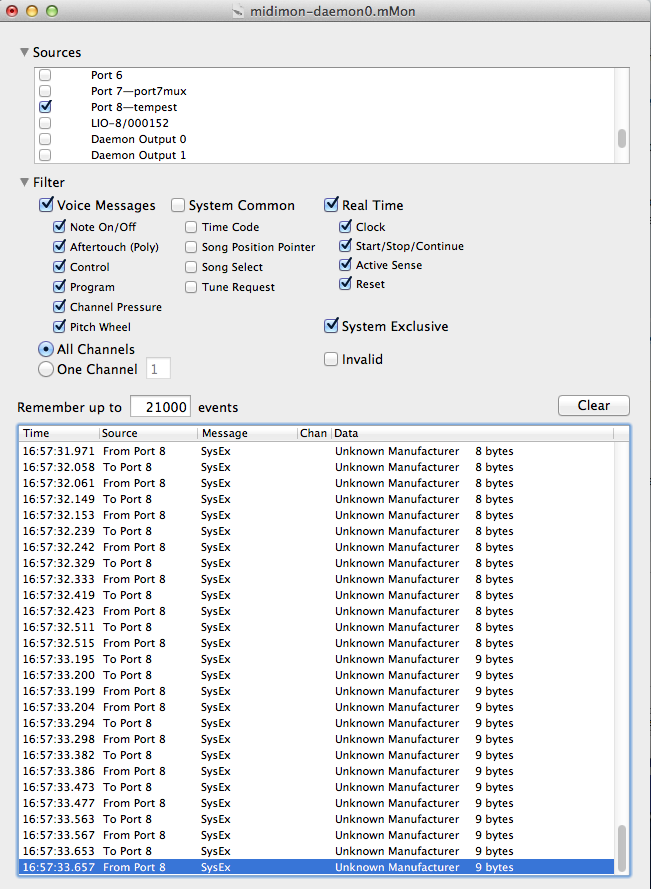
emagic AMT-8: causes template to crash after a few moments into test with only 8byte to 9byte packets. Couldn't get a screenshot on iPad.
Got one here at the computer MIDI montor (the selected port doesn't actually have a Tempest on it.. only a label):
[img]http://d-spacestudios.com/lemurDev/interfaceTest/monTest-1-daemon.png[/img]
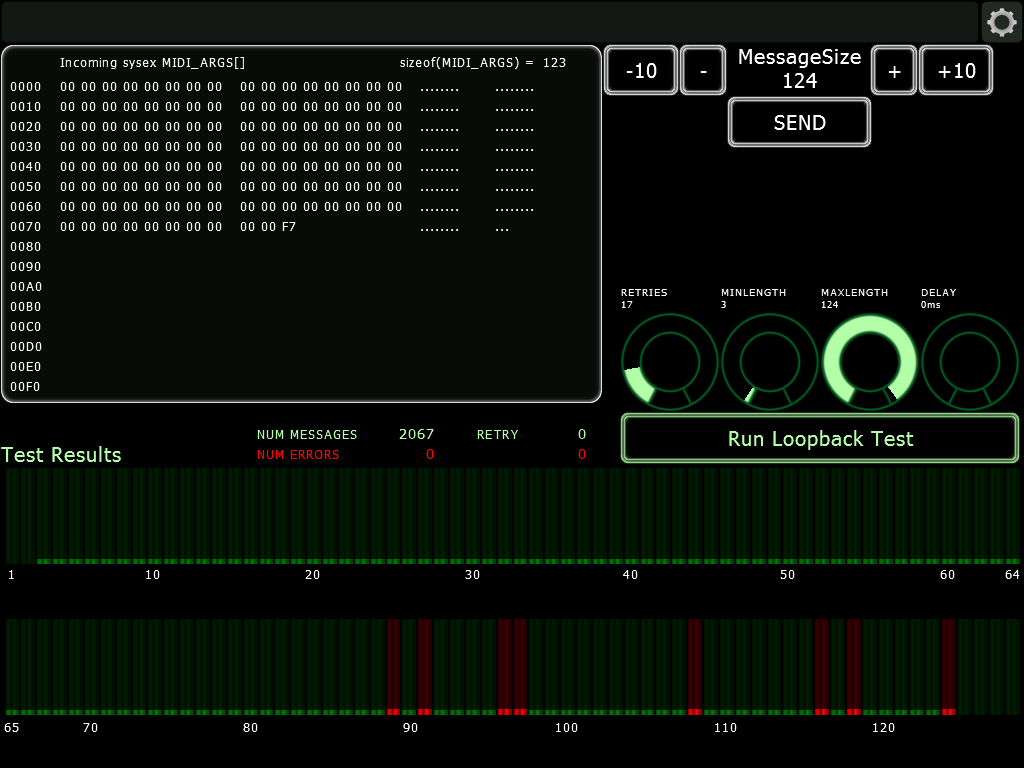
Then did a cable loopback on m-audio MIDIman 2x2 anniv, excellent results. I ran several of these, this one uses the lowest delay setting and 3-124 length:
[img]http://d-spacestudios.com/lemurDev/interfaceTest/sysex-test-midiman2x2.png[/img]
Very interested in additional tests...
I ran the loopback MIDI cable from the in to out on two USB to Lemur daemon connected MIDI interfaces.
emagic AMT-8: causes template to crash after a few moments into test with only 8byte to 9byte packets. Couldn't get a screenshot on iPad.
Got one here at the computer MIDI montor (the selected port doesn't actually have a Tempest on it.. only a label):
[img]http://d-spacestudios.com/lemurDev/interfaceTest/monTest-1-daemon.png[/img]
Then did a cable loopback on m-audio MIDIman 2x2 anniv, excellent results. I ran several of these, this one uses the lowest delay setting and 3-124 length:
[img]http://d-spacestudios.com/lemurDev/interfaceTest/sysex-test-midiman2x2.png[/img]
Very interested in additional tests...
dsorlien wrote:The template in my post above has a nice data display, that should be familiar to programmers. SYSEX messages received on MIDI 0 will be displayed in hex and ascii.
To use the loopback test, create a feedback loop such that the Lemur MIDI 0 output is routed back to Lemur MIDI 0. This can be wireless only, or hardware MIDI, or a combination.
The test takes a long time to run. The progress and results are shown graphically using multisliders.
I hope we can share iPad screen grabs of our test results. I will be testing various configurations this weekend.
Great template! I did some more tests with different interface scenarios (see attached screen shots). Here are the results. Could that be a limitation in the buffer sizes of the interfaces themselves?
Scenario 1:
Ipad to an IConnect Midi interface; via USB cable into PC; soft midi loop using MIDI OX.
Scenario 2:
Ipad via camera connection kit to a cheap no-name USB interface to physical midi in of an MOTU firewire interface; soft midi loop using MIDI OX.
Scenario 3:
Ipad via WIFI and Lemur Daemon to USB MIDI of a MOTU firewire interface; hard midi loop with a midi cable.
Seems like in my setup the WIFI connection gives me the best results.
SysexScenarios.zip
Some test results:
iPad, wifi connection to MacBook, running Lemur Daemon and Midi Patchbay. Using Midi Patchbay I create a connection between Daemon 0 in and Daemon 0 out, creating the loopback path.
[img]http://images.lilypix.com/albums/userpics/10075/loopbak_wifi.jpg[/img]
iPad, wifi connection to MacBook, running Lemur Daemon and Midi Patchbay. MIDI from Daemon 0 is routed to one port of a MOTU MicroLite USB midi interface. A MIDI cable is used to create the loopback path, MIDI data is routed from the MOTU MicroLite to Daemon 0 output, and back to the iPad over wifi.
[img]http://images.lilypix.com/albums/userpics/10075/loopbak_wifi_ultralite.jpg[/img]
iPad with camera connection kit USB adapter, using my DIY MIDI interface and a plug that loops mid out back to midi in. The code running on the Teensy 2.0 buffers all incoming sysex messages of up to 256 bytes (which is more than enough for this test) before passing the message to the iPad.
[img]http://images.lilypix.com/albums/userpics/10075/loopbak_teensyusbmidi.jpg[/img]
iPad, wifi connection to MacBook, running Lemur Daemon and Midi Patchbay. Using Midi Patchbay I create a connection between Daemon 0 in and Daemon 0 out, creating the loopback path.
[img]http://images.lilypix.com/albums/userpics/10075/loopbak_wifi.jpg[/img]

iPad, wifi connection to MacBook, running Lemur Daemon and Midi Patchbay. MIDI from Daemon 0 is routed to one port of a MOTU MicroLite USB midi interface. A MIDI cable is used to create the loopback path, MIDI data is routed from the MOTU MicroLite to Daemon 0 output, and back to the iPad over wifi.
[img]http://images.lilypix.com/albums/userpics/10075/loopbak_wifi_ultralite.jpg[/img]

iPad with camera connection kit USB adapter, using my DIY MIDI interface and a plug that loops mid out back to midi in. The code running on the Teensy 2.0 buffers all incoming sysex messages of up to 256 bytes (which is more than enough for this test) before passing the message to the iPad.
[img]http://images.lilypix.com/albums/userpics/10075/loopbak_teensyusbmidi.jpg[/img]

Hi guys,
I've done a few tests. Did not experience the Lemur app freezing however, but I can confirm there seems to be some issues with long SysEx messages with certain hardware interfaces.
iRig MIDI — Confirmed that receiving SysEx is also problematic. SysEx messages are truncated to the first 2 bytes.
iConnect MIDI — Inconsistently truncated, especially with long messags (over 200 bytes).
Lemur Daemon — SysEx messages received flawlessly, up to 248 bytes (included 240 and 247 bytes),
Best,
Nick